Professional Dashboard
The Professional Dashboard is the main control center for aviation professionals and job seekers. It provides access to profile management, job applications, interview tracking, and personalized job recommendations.
This section ensures professionals can manage their aviation careers effectively within the system.
Overview
The dashboard automatically checks if the professional’s subscription plan is active. Only users with an active subscription can access advanced features such as applying for jobs or viewing career insights.
| Status | Description |
|---|---|
| Active Subscription | Full access to all professional tools and insights. |
| Expired Subscription | Limited access — renew subscription to continue applying and tracking interviews. |
Profile Update & Status
Professionals can update their personal and career profiles directly from the dashboard. Maintaining an up-to-date profile increases visibility to recruiters and improves job match accuracy.
| Field | Description |
|---|---|
| Profile Picture & Basic Info | Upload a profile photo, update contact details, and professional summary. |
| License & Certification Details | Add or edit aviation-specific licenses and certifications (e.g., ATPL, AME, PPL). |
| Experience Level | Define seniority level such as First Officer, Captain, or Aircraft Engineer. |
| Status Indicator | Displays “Active”, “Open to Opportunities”, or “Unavailable”. |
Scheduled Interviews
This section lists all upcoming interviews scheduled by recruiters. Professionals can view interview details, location, and communication mode.
| Column | Description |
|---|---|
| Job Title | The position the candidate is being interviewed for. |
| Recruiter/Company | The hiring organization’s name. |
| Interview Date | Scheduled date and time of the interview. |
| Mode | In-person, Virtual (Video), or Phone Call. |
| Status | Confirmed, Pending, or Rescheduled. |
Applications Sent
The Applications Sent tab displays all job applications submitted by the professional. Each record includes submission date and current application status.
| Column | Description |
|---|---|
| Job Title | The applied position. |
| Company | The employer or airline name. |
| Date Sent | The date the application was submitted. |
| Status | Under Review, Shortlisted, Interviewed, or Rejected. |
Find Jobs
Professionals can search and explore available aviation roles through the Find Jobs page integrated within the dashboard.
Search Filters
| Filter | Description |
|---|---|
| Keyword / Job Title | Search for roles like Flight Instructor or Maintenance Engineer. |
| Location | Filter by country, city, or airport base. |
| Job Type | Full-time, Contract, or Temporary. |
| Department | Flight Crew, Maintenance, Ground Operations, etc. |
| Aircraft Type | Match jobs based on specific aircraft ratings (e.g., B737, A320). |
My Applications
This tab provides a detailed record of all applications made by the professional, including outcomes and recruiter feedback.
| Field | Description |
|---|---|
| Job Title | Position applied for. |
| Status | Current state of the application. |
| Feedback | Recruiter comments or progress updates. |
| Date Updated | The latest change in application status. |
Recommended Jobs
Based on the professional’s profile, experience, and previous activity, the system automatically recommends suitable aviation opportunities.
| Field | Description |
|---|---|
| Job Title | Suggested role based on profile match. |
| Match Score | Indicates how closely the candidate fits the job requirements. |
| Location | Job’s geographical base. |
| Apply Button | Quick link to view and apply for the role. |
Career Insights
The Career Insights section provides analytics and resources to help professionals understand market demand and improve their profiles.
| Feature | Description |
|---|---|
| Application Success Rate | Percentage of applications leading to interviews. |
| Profile Completeness | Measures how detailed the candidate’s profile is. |
| Trending Aviation Roles | Displays roles currently in high demand. |
| Skill Recommendations | Suggests training or certifications to enhance employability. |
Recent Applications
Displays the most recent applications submitted, providing quick access to track their current status.
| Field | Description |
|---|---|
| Job Title | Recently applied position. |
| Recruiter / Company | Hiring organization. |
| Status | Current progress of the application. |
| Date Applied | Submission date. |
Example Interface (Screenshot Placeholder)
Below is a sample Professional Dashboard layout showcasing the profile status, job listings, and recent activities.
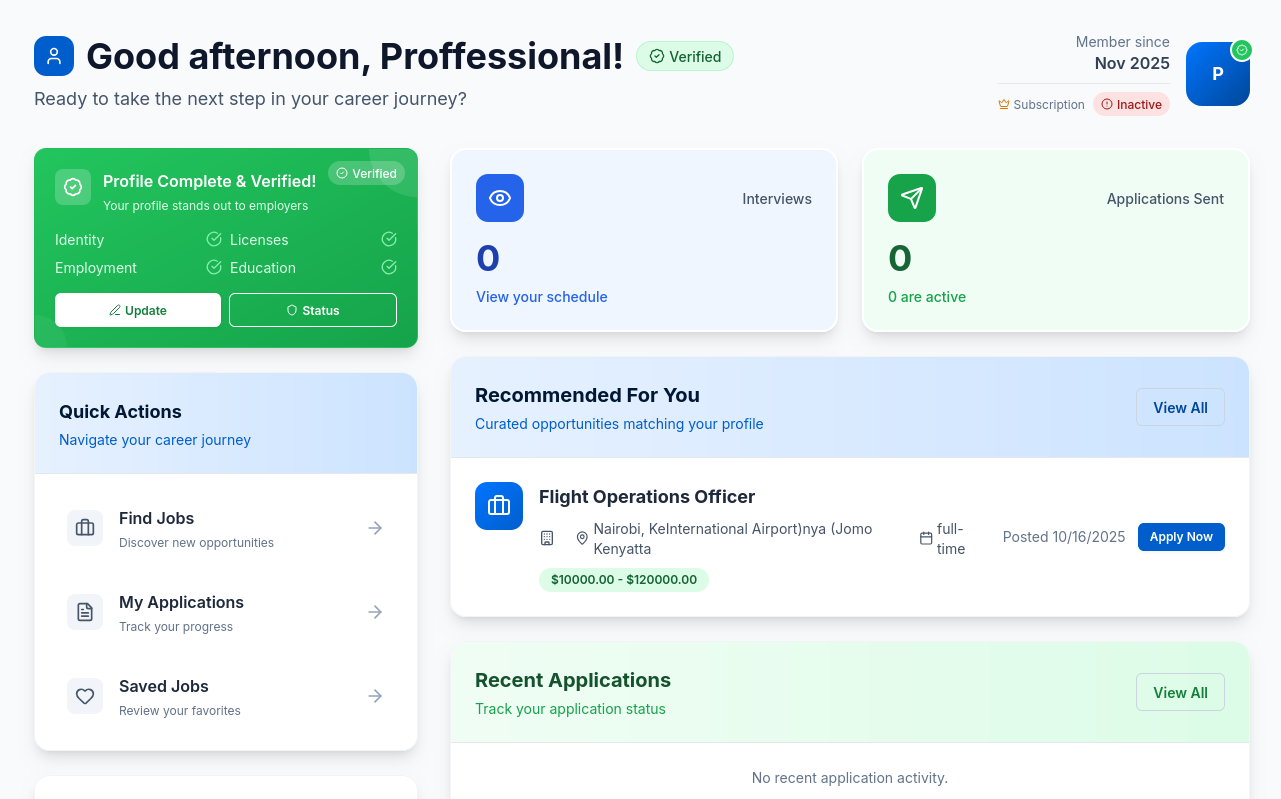
Screenshot: Example interface showing professional activity summary, subscription status, and job insights.
Notes
- The system automatically sends notifications for upcoming interviews and job updates.
- Professionals can export their application history as a report.
- Career Insights refresh weekly based on new job postings and user activity.
Tip: Keep your profile at 100% completeness to maximize visibility and unlock better job recommendations.