Find Jobs
The Find Jobs page enables professionals to explore all active job openings available within the Aviation Recruitment System. This page provides a user-friendly interface with advanced search and filter tools to help candidates quickly locate positions that match their qualifications and career goals.
Overview
All job listings displayed on this page are active and open for applications. Professionals can browse, filter, and apply directly through the system or external job portals linked by recruiters.
The listings automatically refresh to include newly posted aviation opportunities such as pilot, engineering, maintenance, and operations roles.
Search Filters
The search filters provide precise control over job discovery, ensuring professionals can find relevant positions based on their skills and preferences.
Available Filters
| Filter | Description |
|---|---|
| Job Title | Allows searching by keyword or specific role (e.g., Flight Instructor, Aircraft Technician, Cabin Crew). |
| Location | Filters jobs by city, airport, or country base (e.g., Nairobi, Dubai International Airport). |
| Department | Restricts results to a specific division such as Flight Crew, Engineering, Ground Operations, or Administration. |
| Job Type | Filters by employment nature — Full-time, Part-time, Contract, or Internship. |
| Experience Level | Sorts by seniority level — Entry-Level, Intermediate, Senior, or Captain. |
| Salary Range | Allows filtering by minimum and maximum salary brackets (e.g., KES 100,000 – 300,000). |
Applying Filters
Professionals can apply one or more filters simultaneously to refine the results.
Steps
- Enter a keyword or job title in the search field.
- Select location or leave blank for all locations.
- Choose filters for department, job type, experience level, and salary range.
- Click Apply Filters to update the results list.
- The system displays only active job postings that match the selected criteria.
A Clear Filters option resets all selections and shows all available jobs again.
Job Listings
After filters are applied, the system displays a list of jobs with brief summaries for easy browsing.
| Field | Description |
|---|---|
| Job Title | Clickable title leading to the full job description page. |
| Company / Recruiter | The organization or airline posting the job. |
| Location | The job’s base or airport assignment. |
| Job Type | Indicates whether the job is full-time, contract, or part-time. |
| Experience Level | Shows the required candidate seniority level. |
| Salary Range | Displays the compensation bracket or “Negotiable.” |
| Posted On | Date when the job was first published. |
| Apply Button | Allows candidates to submit their application directly. |
Example Interface (Screenshot Placeholder)
Below is an example of how the Find Jobs page may appear with filters, job cards, and search tools.
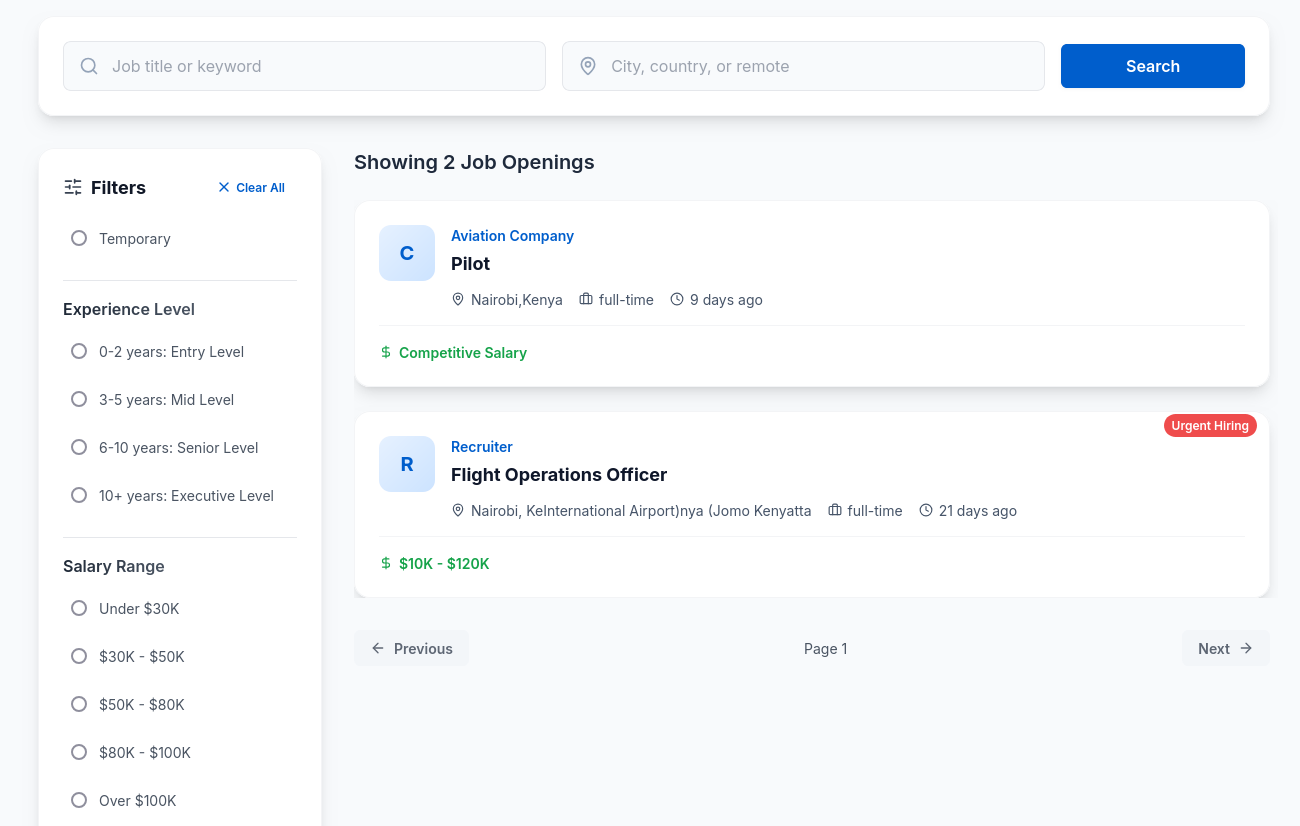
Screenshot: Example interface showing active jobs with search and filtering options.
Notes
- All filters can be combined for highly targeted searches.
- Job results are automatically sorted by most recent postings.
- Only active jobs appear; expired or filled positions are hidden automatically.
- Saved filters persist for the user’s next session to simplify repeated searches.
Tip: Use filters like Aircraft Type and Experience Level together to quickly locate roles that best fit your license or flight hours.